Supplier API Quick Start: Create, Update, Delete Products and Fulfill Orders

Supplier teams that sync catalogs into Accplanet need a clear loop: create or update products, keep stock honest, fulfill orders, and handle refunds or tickets when something goes wrong. This quick start walks that loop using the live Supplier API docs.
Accplanet is a supplier aggregation marketplace. You fulfill inventory; the platform handles buyer discovery, checkout, tracking, and support tooling. Use these endpoints for legitimate catalog and order operations only — not for policy evasion or unsafe automation.
In short
- Auth with
X-API-Key,Authorization: Bearer, bodykey/apikey, or an active supplier dashboard session. - Products: upload image → create → list/update → append auto-delivery accounts → delete only when rules allow.
- Orders: list → get → update delivered info / attachment → change status → refund when appropriate.
- New listings may need admin approval before they appear publicly.
- Keep the official docs open for exact paths and parameter tables while you code.
Authentication
Use your supplier API key from your profile. JSON product/order calls typically send:
X-API-Key: YOUR_API_KEY
Content-Type: application/json
Browser session auth also works when you are logged into the supplier dashboard — useful with the docs Test API panel.
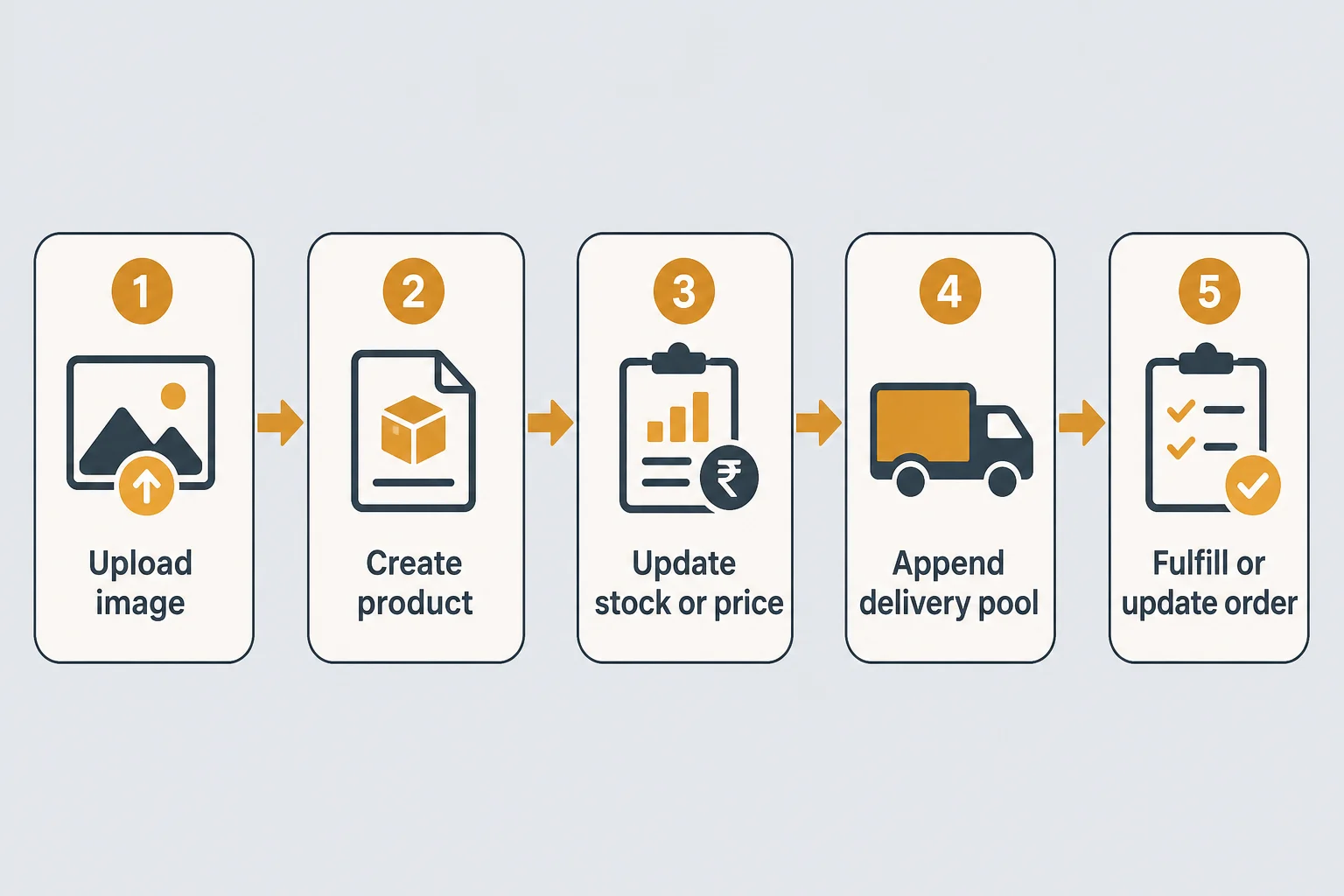
Product lifecycle
1 · First
Upload image
POST /products/api/supplier/upload-image/ with multipart image file. Save returned image_path for the images array on create/update.
2 · Create
Create product (or upsert by source URL)
POST /products/api/supplier/create/ requires category_id, title, description, price. Optional: stock, min_quantity, images, source_product_id, source_product_url, warranty_period_days, status, and auto-delivery pools via accounts or accounts_text.
If source_product_url matches an older item under your account, the API may update that item instead of creating a duplicate (created/updated flags in the response). Watch approval_status.
3 · Maintain
List, look up, update
GET /products/api/supplier/products/— paginated list with search, category, status, price filters.GET /products/api/supplier/products/by-source-id/<source_product_id>/— fast path for hot-sync by upstream ID.POST /products/api/supplier/products/<product_id>/update/— patch title, price, stock, images, source fields, status, or delivery pool fields.
Identify products by numeric catalog ID or product_id from list responses. Buyers later see catalog IDs as Customer API service values when assigned.
4 · Delivery pool
Append auto-delivery accounts
POST .../products/<product_id>/accounts/ adds credentials to the automatic delivery pool without rewriting listed stock. Use structured accounts objects or accounts_text lines (user:pass / user|pass). Handle returned accounts_imported carefully — these are secrets.
5 · Remove
Delete when allowed
POST .../products/<product_id>/delete/ permanently removes a product that has no completed sales. Prefer status changes when you only need to stop selling.
| Endpoint focus | Method path (host accplanet.com) | Typical use |
|---|---|---|
| Upload image | POST /products/api/supplier/upload-image/ |
Get image_path |
| Create | POST /products/api/supplier/create/ |
New listing / source-url upsert |
| List | GET /products/api/supplier/products/ |
Sync state |
| By source ID | GET .../by-source-id/<id>/ |
Hot sync |
| Update | POST .../products/<id>/update/ |
Price, stock, copy |
| Append accounts | POST .../products/<id>/accounts/ |
Auto-delivery pool |
| Delete | POST .../products/<id>/delete/ |
Remove unused SKU |
Order lifecycle
After buyers purchase, fulfill through the Orders APIs:
- List —
GET /orders/api/supplier/orders/with optionalstatus,search, pagination. - Get —
GET /orders/api/<order_id>/when you need one order snapshot. - Deliver —
POST .../orders/<order_id>/delivered/withdelivered_info(plain text or JSON array string). Setappend_delivered_info=trueto append rows. Or upload a file via.../delivery-attachment/(multipartfile, ≤10MB). - Status —
POST .../orders/<order_id>/status/with allowed values such aspending_order,running_order,completed_order,refunded_order.receipt_confirmed_ordercannot be set via API. - Refund —
POST .../orders/<order_id>/refund/for a full refund when your process requires it.
Track delivered_units, remaining_to_deliver, and payment fields from list/get responses so your warehouse logic matches the dashboard.
Auto-delivery pool
Preload accounts on the product; Accplanet can queue delivery tasks.
Manual delivered_info
Push credentials or keys per order when fulfillment is hand-managed.
Attachment
Upload a single fulfillment file when text fields are not enough.
Tickets, payments, balance
- Tickets — list, get, create (
order_id+ title + description), update status/reply under/orders/api/supplier/tickets/. - Payments —
GET /orders/api/supplier/payments/for payment records on your supplied orders. - Balance —
GET /users/api/balance/returns customer and supplier wallet balances for the authenticated account.
Approval status, stock, and order states follow live platform rules. Confirm behavior against the current Supplier API documentation when you ship production sync.
Supplier checklist
- [ ] Supplier API key stored server-side
- [ ]
category_idmapped from Accplanet categories (leaf subcategory when required) - [ ] Create/update path tested with a non-production title first
- [ ] Stock and price updates idempotent in your sync job
- [ ] Delivery pool or manual
delivered_infopath verified on a test order - [ ] Order status transitions match dashboard-allowed values
- [ ] Ticket + refund paths documented for your support team
Next step: open the Supplier API documentation, authenticate with Test API, create one draft product, then practice list → deliver → status on a sandbox-style order. Buyers integrating purchases should use the Customer API quick start on Accplanet’s blog.
FAQ
Why is my new product not visible to buyers?
Listings may require admin approval (approval_status). Keep the item active only when you are ready to sell, and confirm approval in the response or dashboard.
What is the difference between product_id and business_id?
product_id is the system identifier used in supplier paths. business_id is the numeric catalog ID when assigned — buyers often see it as Customer API service.
Does appending accounts change listed stock?
No. Append accounts updates the auto-delivery pool. Manage listed stock via create/update fields separately unless your ops process ties them together.
Which order statuses can I set via API?
Documented values include pending_order, running_order, completed_order, and refunded_order. Buyer receipt confirmation is not settable via API.