How to Open a Telegram Account from Accplanet Zip Delivery (tdata + Session)

How to open Accplanet Telegram zip delivery on Desktop
Download the order zip, extract tdata and session files, add official Telegram Desktop, then launch telegram.exe from that folder.
-
Download the zip
Open your Accplanet order and download the zip from the delivery link in your browser.
-
Extract tdata and session
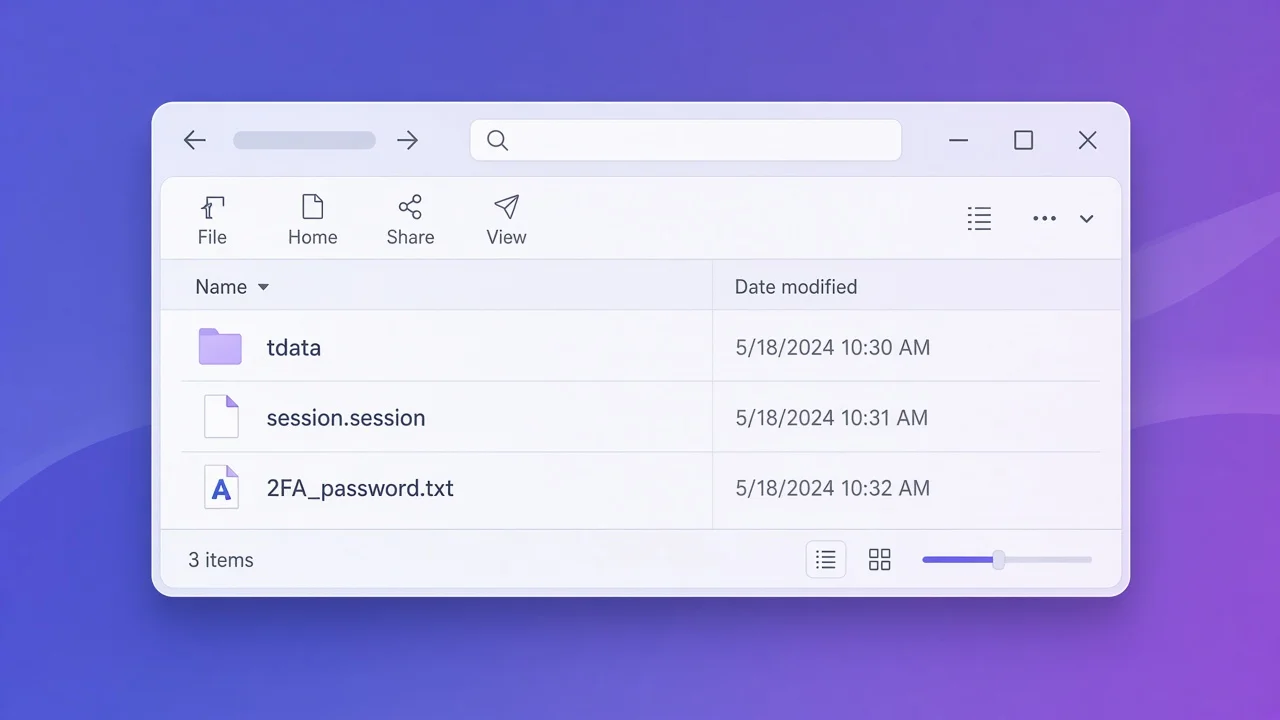
Unzip into a dedicated folder. Confirm tdata, a .session file, and any 2FA password file are present.
-
Add official Telegram Desktop and launch
Download telegram.exe from https://desktop.telegram.org/, place it in the extracted folder, and double-click to open the delivered profile.
You bought a Telegram listing on Accplanet, opened the order, and received a download link. The next question is usually: how do I open this account on my PC?
For this delivery type, suppliers typically send a zip that already contains Telegram Desktop session material: a tdata folder plus a .session file (and sometimes a two-step verification password file). Accplanet is the marketplace where you browse screened listings, pay, and receive delivery. You still install Telegram Desktop from the official site, then place telegram.exe next to the extracted files so the client can load that local profile.
In short
- Use the download link in your Accplanet order to get a zip in the browser.
- Extract the zip. Expect
tdata, a.sessionfile, and sometimes a 2FA password text file. - Get Telegram Desktop only from the official Telegram Desktop download page.
- Put
telegram.exeinto the extracted folder and double-click it to open the delivered profile. - Treat session and tdata like passwords. Outcomes depend on listing notes, device checks, and Telegram account status.
What is inside the zip
After extraction, a typical folder looks like this (placeholder names only):
| Item | Type | What it is for |
|---|---|---|
tdata |
Folder | Telegram Desktop local data used for Telegram tdata backup migration and often for Telegram chat history migration on that desktop profile. |
+1XXXXXXXXXX.session |
Session file | Session material tied to the listing. Handle under Telegram session security rules: do not share, upload to random sites, or paste into public tickets. |
Mat_Khau_2fa.txt (name varies) |
Text file | Often the cloud password for Telegram two-step verification. Open only if Telegram asks for a 2FA / cloud password. |
Exact filenames follow the supplier’s packaging. Always prefer the live product description and order notes over assumptions.
Open the account in 4 steps
1 · First
Download the zip from your Accplanet order link
Open the order detail and use the link you received. Download the file in your browser. You should get a zip archive. If the link expires or fails, contact Accplanet support with your order ID before trying random mirrors.
2 · Required
Extract the zip to a dedicated folder
Unzip to a new folder on your PC (for example Desktop\tg-order-123). Confirm you see tdata plus session-related files. Do not mix two different orders into the same folder.
3 · Required
Download Telegram Desktop from the official website
Go to https://desktop.telegram.org/ for the Telegram Desktop official download. Prefer the Windows portable / desktop build your listing expects. Avoid third-party “cracked Telegram” installers.
4 · Open
Place telegram.exe in the extracted folder and launch it
Copy telegram.exe into the same folder that contains tdata, then double-click it. Telegram Desktop should load the delivered local profile. If Telegram asks for two-step verification, use the password from the 2FA text file in that folder (when provided).
Telegram Desktop official download
Search ads and random “Telegram PC” pages can ship malware. For Accplanet buyers, the safe default is always the official page: desktop.telegram.org. After download, verify you are placing the real telegram.exe into your extracted order folder — not launching a different installed copy that points to another profile path.
Telegram session security
A .session file and a populated tdata folder are high-value secrets. Practical rules:
- Store the zip and extracted folder offline or in encrypted storage.
- Do not forward session/tdata packs in public chats or support screenshots.
- If you no longer need the listing, delete local copies and review active sessions inside Telegram when you can.
- If someone else obtained the same pack, they may control the account — treat leaks as credential compromise.
tdata backup, chat history, and 2FA
tdata backup migration
Keeping tdata with the matching Desktop binary is the usual way this Accplanet zip delivery restores the desktop profile on your machine.
Chat history migration
Local history visibility depends on what the supplier packaged in tdata and on Telegram’s sync. Do not assume every cloud chat is fully offline-mirrored.
Two-step verification
If a password file is included, use it only when Telegram prompts for the cloud password. Wrong guesses can lock the account temporarily.
Buyer checklist
- Order download link works and zip extracts cleanly.
tdatapresent; session / 2FA files match the listing description.- Telegram Desktop taken from desktop.telegram.org.
telegram.exesits in the extracted folder before launch.- No sharing of session/tdata; support tickets use order ID, not raw secrets.
FAQ
Why does Telegram open as a new login instead of the account?
Usually telegram.exe is not in the same folder as tdata, or you launched a different installed copy that points to another profile path.
Do I need the phone SMS code?
Many zip/tdata deliveries are designed to open without a fresh SMS login. If Telegram still demands a code, stop and check the product notes or contact Accplanet support with your order ID.
Is the session file enough alone?
Follow the listing. This Accplanet flow is documented around session + tdata plus official Desktop, not a phone-number login tutorial.
Can Accplanet guarantee the account stays online forever?
No. Listings age, Telegram policy changes, and supplier packaging differ. Read the live listing notes before repurchase.